
Managing vacation rentals, short-term rentals (STRs), or corporate housing properties involves juggling multiple operational tasks. From housekeeping and maintenance to inventory management and guest communication, it’s easy for items to slip through the cracks.
EZcare continually enhances its platform to help property managers streamline operations, maintain consistency across multiple properties, and deliver guest-ready experiences. In this post, we'll highlight the latest EZcare features you may not know about, including the Snapshot dashboard, mobile app updates, improved messaging UI, maintenance enhancements, and customizable workflows.
Overview of EZcare Enhancements
EZcare's recent updates focus on increasing team efficiency, improving communication, and providing better operational oversight. Key features include:
● Snapshot Dashboard
Monitor daily arrivals, departures, and scheduled tasks in one view.● Mobile App Updates
Sync job data between team members, upload to the web before task completion, and report "On My Way" status to admins or guests.● Improved Messaging UI
Communicate faster and search messages by keyword.● Regrouped Jobs Page
Streamlined menu for easier navigation.● Maintenance Cost Tracking
Add labor hours and parts costs directly in job forms.● Manage Complex Multi-Day Maintenance Work Orders
Track multi-stage jobs with follow-ups and part orders.● Workflows for Automation
Set rules for recurring or automated task scheduling.● Customizable Settings
Company-wide or form-level settings, including:
1. Auto-move a job to the next check-out date
2. Show form name initials on calendar tiles
3. Always show in-progress jobs on today's calendar
4. Display completed jobs on the due date instead of completion date
5. Automatically archive system-created teams with no open jobs
These updates empower property managers to proactively manage operations, keep staff aligned, and scale efficiently across multiple properties.
Watch the full webinar: "The EZcare Features You May Not Know" and discover hidden tools that streamline vacation rental operations.
Snapshot: Bird's-Eye View of Daily Property Activities
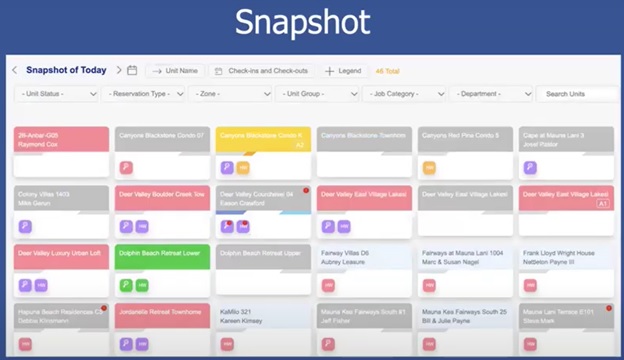
The Snapshot dashboard gives managers a high-level view of all daily activities:
● See arrivals, departures, and tasks at a glance
● Prioritize housekeeping, maintenance, and inspections
● Ensure properties are guest-ready on time
With Snapshot, managers can instantly identify which units are ready, which need attention, and allocate resources efficiently. This reduces last-minute stress and ensures guests experience consistent, high-quality service.
Mobile App Updates: Sync, Collaboration & "On My Way" Reporting
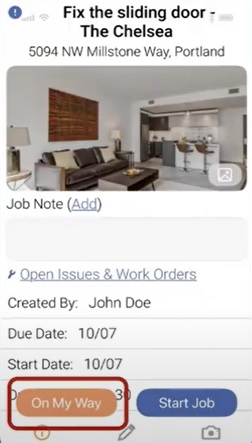
EZcare's mobile app enhancements improve team coordination and allow data to flow seamlessly:
● Sync Job Data Between Team Members: If a task is assigned to a team, answers entered in the app's data tab can now be viewed by all team members.
● Upload Data to the Web Before Job Completion: Managers can monitor progress in real-time, even before tasks are fully finished.
● Report "On My Way": Staff can notify admins and guests that they are en route, improving transparency and communication.
● View Other Team Members' Responses: Improves transparency and reduces errors.
● 2–3 Minute Lag Time: Minimal delay ensures up-to-date information is available to everyone.
These updates allow teams to coordinate effectively, respond quickly to urgent issues, and maintain operational standards without waiting for task completion.
Regrouped Jobs Page: Streamlined Navigation
EZcare has reorganized the Jobs page to improve usability:
● Similar functions are grouped together for efficiency
● The previous "Sync with Cloud" is now "Sync My Jobs"
● Help items are relocated to the bottom for a cleaner layout
● A new "Icons on This Page" guide explains app symbols for clarity
This reorganization helps staff find functions faster, minimizes training time, and reduces mistakes.
Improved Messaging UI: Faster, Smarter Communication
Effective communication is critical for operational success. The updated messaging system includes:
● Keyword Search: Quickly find specific messages
● Auto-Displayed Recipient List: When creating a message, recipients appear instantly with a search box
● Internal & Guest Messaging: Send updates to team members or guests through the app
● Custom Templates: Standardize repetitive messages, like check-in reminders or maintenance updates
These improvements allow teams to stay aligned, informed, and responsive, even under high-pressure operational situations.
Maintenance and Housekeeping Features
EZcare goes beyond a typical PMS by offering robust housekeeping and maintenance tools:
● Multi-Day Maintenance Workflows: Track complex, multi-stage jobs, including follow-ups and part orders
● Automated Housekeeping Scheduling: Assign tasks based on staff availability and workload
● Real-Time Updates: Field staff can report urgent issues or mark tasks complete on the mobile app
● Integration with Inventory and Linen Management: Ensure units are fully stocked and ready for guests
These features reduce errors, save time, and maintain consistency across multiple properties.
How These Features Benefit Your Team
Using EZcare's latest enhancements, teams can:
● Complete tasks faster and with fewer errors
● Coordinate seamlessly across multiple properties
● Monitor operations in real-time, preventing delays and missed tasks
● Deliver a better guest experience, boosting reviews and repeat bookings
The combination of Snapshot, mobile app syncing, improved messaging, and maintenance updates keeps operations organized and staff aligned, even under pressure.


